I live off grid with my partner and 2 young kids. We’ve wanted an EV for a while now, but it’s a little challenging to manage off grid as we can’t just charge overnight the way most people who are ready to transition to EVs can. We’re also a fair way from any fast charging infrastructure. I think we’ve made it work, so thought I’d write up some of the thought process and learnings thus far.
Why the Model 3?
To meet range requirements during winter, when charging will be difficult for 2-4 weeks, we wanted a car with enough range to get through a normal week (roughly 350km) on a single charge. Public charging infrastructure is available but 50kW chargers start at 25km / 25 minutes away and faster ones 70km / 1 hour away, so we don’t want to have to burn a lot of time and range doing it multiple times a week.
The only two “affordable” cars we found with adequate range were:
- Tesla Model 3
- Hyundai Kona MY 2021
Tesla have a car maintenance schedule that is within my abilities to manage at home v.s Hyundai who currently only service the electric Kona in Melbourne (a 3-4 hour round trip) and require regular servicing.
The Kona uses LiPo batteries which degrade faster when charged above 80% and the Model 3s manufactured in China use LFP batteries which don’t have the same limitation. Tesla state that the LFP battery “should be charged to 100% whenever convenient in order to maintain long-term battery health” - which I think is mostly about cell balancing and SoC calibration, not directly cell health.
As we’re planning to opportunistically charge from solar, having to manage the 80% SoC limitation of LiPo cells would just be an extra complication and as such the choice was simple - the Model 3 or wait. We didn’t want to wait.
Charging an EV in general
In Australia we’ve settled on the CCS2 connectors:

For charging at home we are interested in the AC Type 2 (aka Mennekes, aka IEC 62196) portion of that connector:
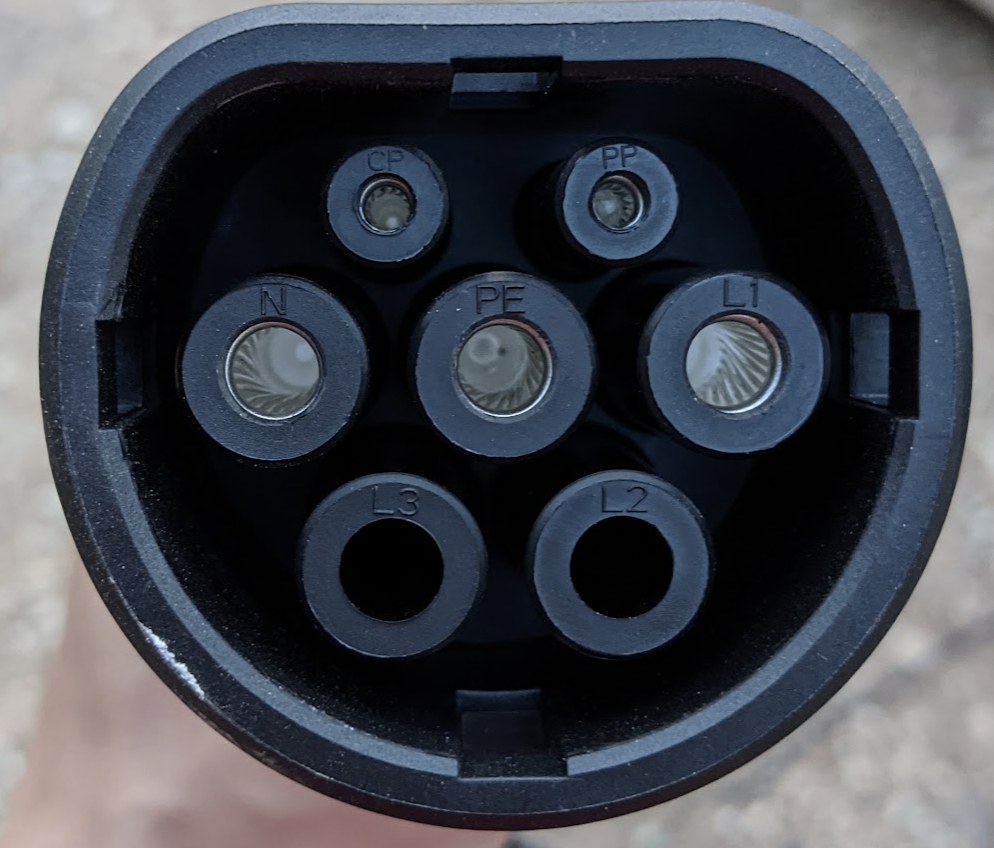
Start with a standard power plug, upgrade the amperage, add in optional 3 phase and a few data pins and this is what you get.
An Electric Vehicle Supply Equipment (EVSE - “charger”) is required to take whatever AC power is available at the site, mix in some signaling data so the car knows how many amps are available and do some safety checks before engaging a contactor (big clicky relay).
Charging an EV off grid
EV batteries are large. In our Model 3 Standard Range Plus, the battery is 50-60kWh (Tesla actually don’t publish the exact specs and I still haven’t verified if we have the unicorn model). Our house battery is 24kWh LFP with 19.2kWh usable. Charging an EV from a house battery is not practical with current batteries.
Off grid solar generally has to be larger than is required on grid for a similar energy usage as it needs to produce enough to supply the house on marginal production days. That means when it’s sunny, there’s a lot of otherwise unused energy available.
If the driving pattern suits (ours does) - EVs and off grid seems like a perfect match.
Unfortunately there’s no off the shelf EVSEs that work with off grid / hybrid inverters to track solar generation - at least that I could find.
Our off grid power system
The brains of our system is a Selectronic SP Pro SPMC482-AU. It turns DC from the battery in to AC for the house and recharges the DC batteries from coupled AC like our Fronius (on grid style) solar inverter or AC inputs like our generator. It keeps track of battery State of Charge (SoC), temperatures and has enough inputs in general to be the thing that’ll alarm first if anything ever does go wrong.
If I thought there was better hardware available than a SP Pro, I would probably have got that instead, but I don’t.
Getting data out of the SP Pro
Unfortunately Selectronic’s software engineering clout doesn’t live up to that of their hardware engineers.
The primary way of monitoring a SP Pro is with Select.live - a poorly managed service that depends on a flakey serial device plugged in to the inverter. I’ve had the Select.live device crash a few times a week on average until a few months ago when they finally seemed to get their update process in order. I also found (reported and confirmed they fixed) a security issue in the web interface that would allow any account holder to access data from any other account holder their installer still had access to. All of which to say, I really don’t trust it.
I’ve already got some better (improved resolution and exposing hidden metrics) monitoring from the Select.live device in the form of https://github.com/neerolyte/select-live-influx.
Given the stability issues of the Select.live I’ve been meaning to replace it with my own device that talks serial to the SP Pro - https://github.com/neerolyte/selpi. I may still get back to this project, but as I was also using it as an excuse to learn Python it was a little slow going and it’s a low priority while the Select.live is stable.
The data I need from the SP Pro is just:
- battery Watts - how much power is currently flowing in or out of the house battery
- battery SoC - how full is the house battery
EVSEs
OpenEVSE
I purchased an OpenEVSE kit from the US and added in the components required to suit an AU 32A power point and a Type 2 for the Model 3.
The basic algorithm I’ve implemented is a loop that does:
1 2 3 4 5 6 7 8 9 10 | |
There’s a bit more going on in practice e.g constraining the charge amps within what the EVSE can tell the car to do (minimum 6A and maximum 32A) and enabling/disabling the charger, but that’s enough to track solar once active:
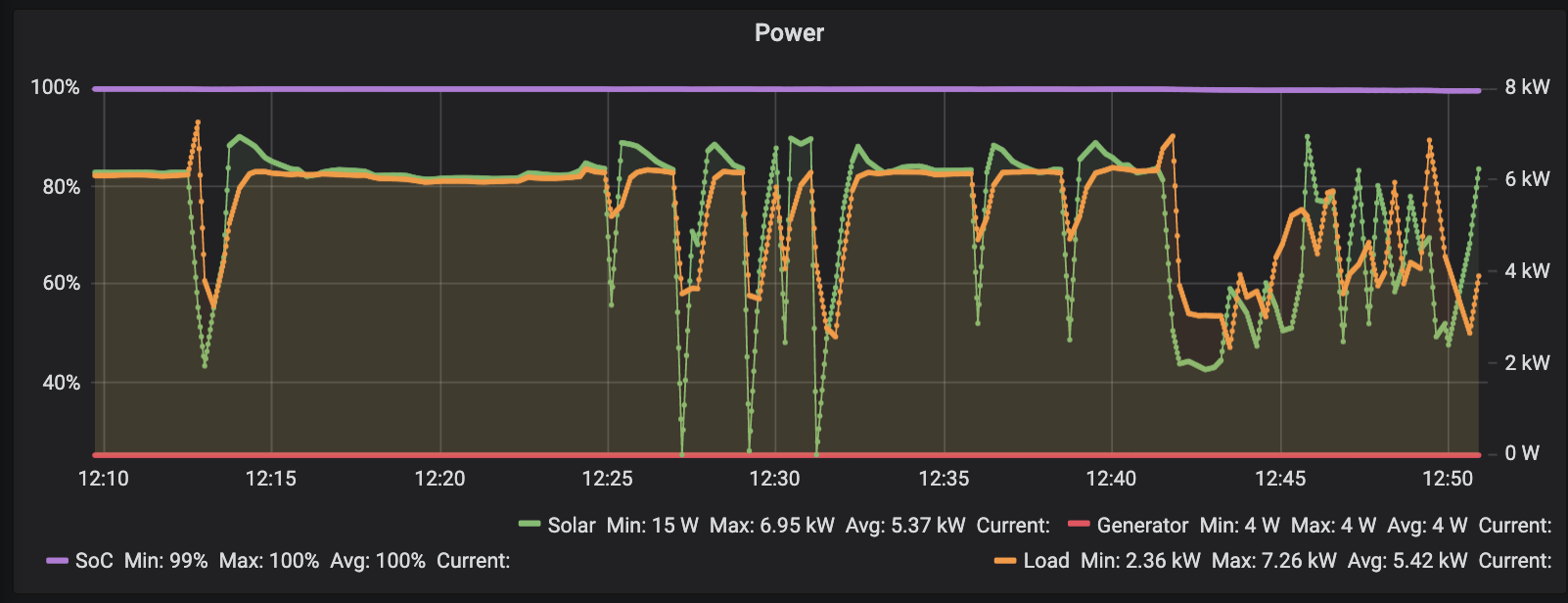
The dips are both due to clouds and an intermittent reset from our Fronious inverter. There’s a small delay, but it will track between 6A and 24A in the current config (one component still needs changing out to get 32A).
The OpenEVSE probably can’t meet Australian Standards given the DIY nature, so this is not really a general option for everyone. I’ve also already hit issues with it overheating in the sun causing it to crash. I’ve built a temporary hat for it, but it was overheating on a 25C day and we get some 45C+ days here.
OpenEVSE has its own solar diversion mode that would probably work if I was already using OpenEnergyMonitor. I may still go down this rabbit hole, but as the actual solar tracking is trivial and I already have all the monitoring I want working, it’s a lot of software to learn and I’d still have to write a plugin for the SP Pro or Select.live to work with OpenEnergyMonitor myself. In the mean time tracking is done with https://github.com/neerolyte/openevse-hackery.
Tesla Wall Connector
The Tesla Wall Connector is a fairly capable Type 2 EVSE with the special Tesla button on the plug that opens the charge port. I assumed the button on the plug was pointless convenience as you can just tap the charge port on the car to open it - but because the car latches on to the Type 2 plug, to disconnect I need to click around in the phone app or on the display from the drivers seat and this is more annoying than I’d expected.
I didn’t know if I could control this charger remotely, which is why I went with the OpenEVSE, but after ordering the OpenEVSE, I found https://github.com/mvaneijken/TWCManager-1 - so I’d pick the Tesla Wall Connector in favour of the OpenEVSE for local network control now. This would also allow all power electronics to be AS compliant and installed professionally.
Tesla UMC
The Tesla Universal Mobile Connector (UMC) is an EVSE that comes with the car.
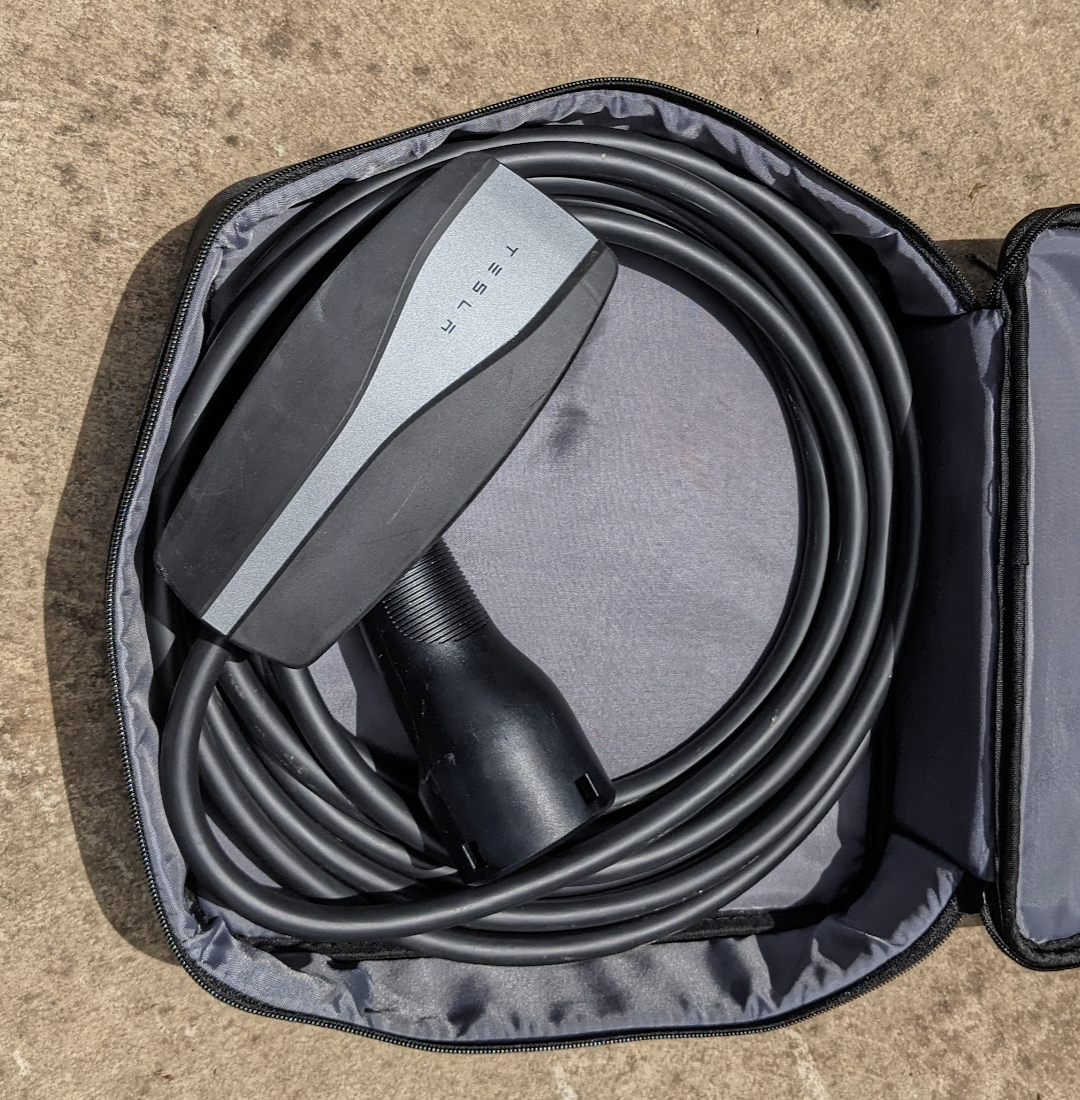
The UMC accepts multiple “tails” that in Australia allows it to supply charge from any single phase supply up to 32A.
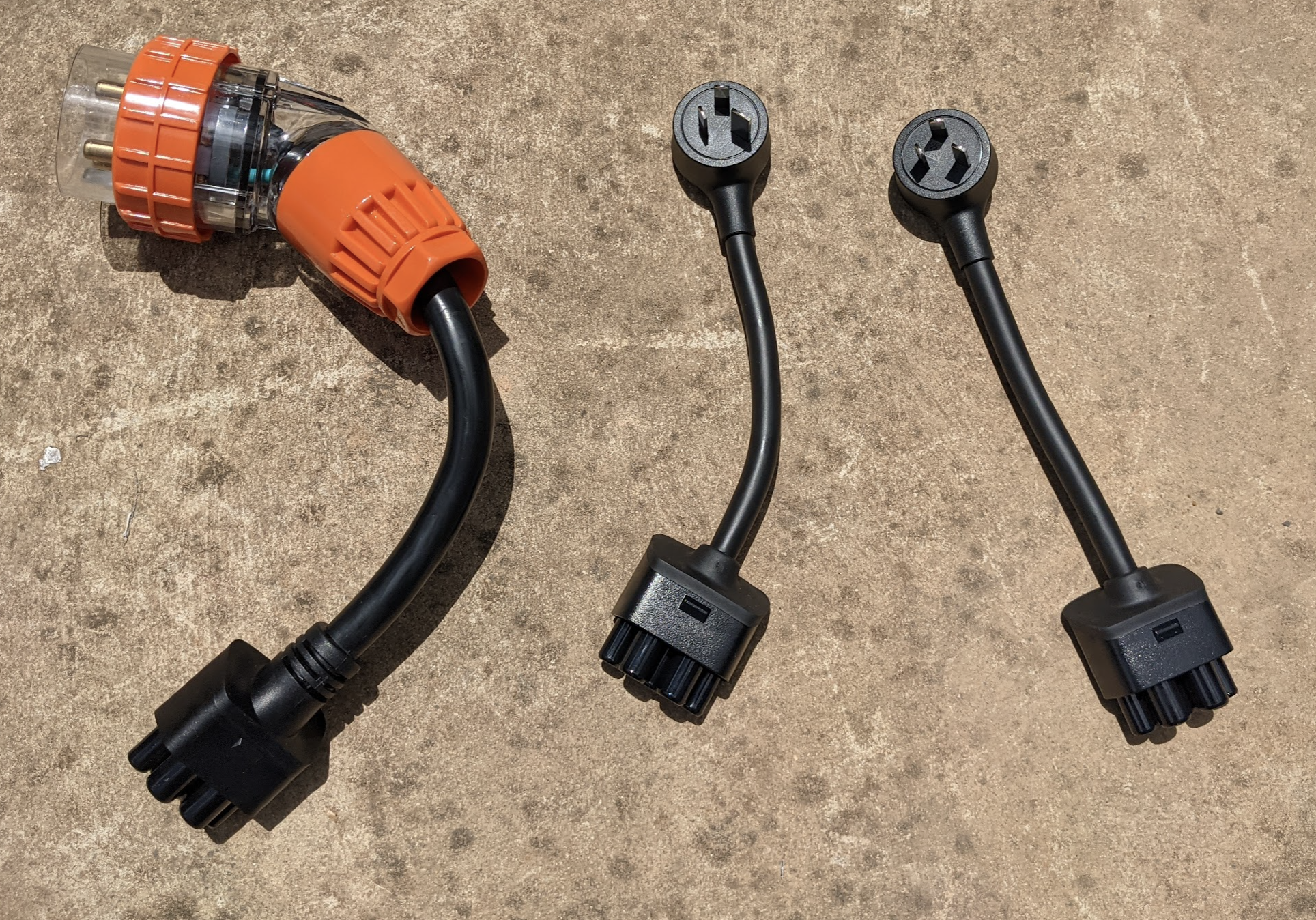
The UMC itself has no way to be told to charge at different rates, but Teslas can be controlled from the app and some of the API is well documented.
This opens up the possibility of having a SaaS product that monitors Select.live over the internet and instructs the car directly what rate to charge at with no additional hardware on site. This is also marginally better for power management as the EVSE PWM signal only goes down to 6A, but from the Tesla phone app and in car UI I can drop the rate to 5A.
Zappi
The Zappi is an EVSE designed to track grid tie solar and optimise charging. Unfortunately with no grid connection for its CT to monitor, using the Zappi would require something hacky like configuring the SP Pro to switch at least one of its outputs based on say house battery SoC and monitoring multiple windings of a small load with the Zappi’s CT. A very blunt on/off charging profile that’ll never utilise as much solar as more direct monitoring and would work the house battery much harder than desireable.
I did contact myenergi about potentially using their internal API to control it, but their response was not inspiring:
Technically, yes it can work off grid, but not very well. It limits lots of features and isn’t the way the zappi was designed to operate – I wouldn’t advise it. There’s lots of things you’d have to change, it would be very complicated.
The reason for this is because a lot of our safety features and product functions rely on a constant flow of electricity.
There’s no safety or lack of continuous power issue off grid (my power is dramatically more reliable than near by grid connected houses), there’s just a desire to control the PWM signal on the control pilot pin with a little more finesse than their device can manage on its own.
Alternative approaches
Charging doesn’t have to be fully automated. Simply using a timer or even plugging on days when there seems to be enough sun should work well enough if there’s a sufficiently well configured and maintained auto start generator to catch the days when the weather is surprising. Even just configuring an early warning alarm on the house battery SoC and disconnecting the EVSE manually could be an option. Not many off gridders are going to be away from home while their car is at home charging.
In the future?
I’d like to integrate solar forecasting such as Solcast to better decide whether the EV or house battery should be prioritised. The free API is adequate for personal monitoring and the prediction generally seems accurate enough to be trusted.
